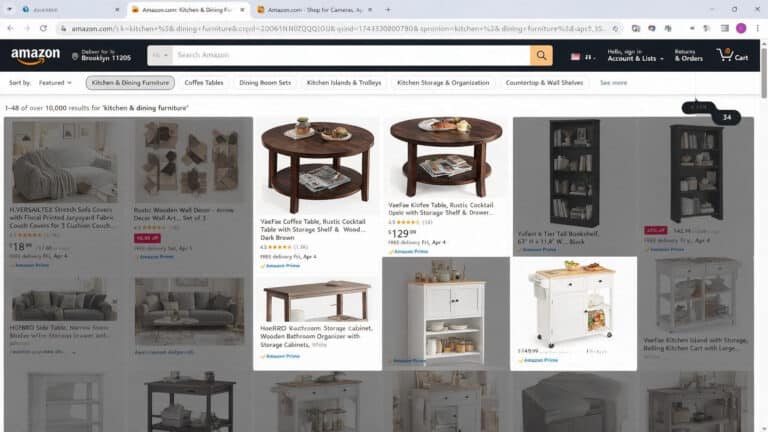
Have you ever found yourself scrolling through Amazon, desperately searching for a simple product, only to be bombarded by a sea of unfamiliar brand names? You’re not alone. This frustrating experience sparked developer Josh Pigford to create a solution: a browser extension called Knockoff. With its ability to filter out unreliable brands, it has quickly gained popularity, racking up tens of thousands of downloads. But how does it work, and should you consider adding it to your online shopping toolkit? Let’s dive into the details.
In this article, we’ll explore the challenges of navigating Amazon’s complex brand landscape, how Knockoff effectively operates to improve your shopping experience, and whether it’s a worthwhile addition to your browser. You’ll discover the intricacies of its detection pipeline and what you need to know before making the leap.
The Challenge of Amazon’s Brand Landscape
Many shoppers face a common dilemma: instead of finding trusted brands like Ryobi or Stihl when searching for replacement parts, they encounter an array of strange, unrecognized names like Jkimk or SUNHZMCKP. These aren’t just quirky brands; they are often pseudonyms created specifically to exploit Amazon’s Brand Registry, allowing sellers to present themselves as legitimate entities without any real reputation or warranty backing their products.
This issue can lead to purchasing products that might not meet quality standards or expectations, leaving customers with buyer’s remorse. Such was the case for Josh Pigford, who, in search of a trimmer part, encountered this brand chaos and decided to take action.
How Knockoff Works: A Seamless Solution
Knockoff utilizes a sophisticated 7-step detection pipeline designed to streamline your shopping experience. Here’s how it functions:
- Allowlist and Blocklist: Your preferences are paramount. Anything on your allowlist won’t be filtered out, while your blocklist ensures unwanted brands are excluded.
- Brand Checks: It cross-references a curated list of approximately 5,000 established brands and known bad actors.
- Heuristic Analysis: If a brand isn’t recognized, the extension analyzes its name for patterns that suggest it’s a fake brand, such as all-caps names or odd letter combinations.
All of this processing occurs locally in your browser, ensuring your shopping data remains private and untracked.
Three Filtering Levels for Customization
You can tailor your experience by choosing from three filtering levels:
- Relaxed: This setting only flags known pseudonyms and items on your blocklist.
- Standard: The default mode flags suspicious names as well as unbranded listings.
- Strict: This option shows only items from known brands, offering maximum security.
Additionally, you can select how filtered items are displayed, making it easy to see what’s been blocked or flagged.
Installing Knockoff Across Different Browsers
If you’re ready to enhance your Amazon shopping experience, installing Knockoff is straightforward. Here’s how:
- Chrome: Head to the Chrome Web Store to add the extension.
- Firefox: Visit the Add-ons page for installation.
- Safari: This requires a bit more effort, as you’ll need to wrap the extension in a native app via Xcode.
For users of other Chromium-based browsers, such as Edge or Brave, you can also find Knockoff through similar channels.
Real-World Testing: What Works and What Doesn’t
Various media outlets have tested Knockoff, revealing both its strengths and weaknesses. For instance, while it correctly flagged many suspicious brands in categories like vacuum cleaners, it occasionally misidentified legitimate brands like Torras due to their all-caps names. This discrepancy highlights the need for users to remain vigilant, as even reliable brands can fall victim to the filtering system.
Categories Tested
- Vacuum Cleaners: Generally effective, with established brands passing through without issue.
- Solar Lights: Successfully blocked many unknown brands while keeping genuine companies visible.
- Phone Cases: Blocked several junk brands but mistakenly flagged Torras, illustrating the importance of user input.
Limitations of Knockoff
While Knockoff is a powerful tool, it’s important to be aware of its limitations. It may miss certain mixed-case gibberish names unless set to Strict mode and can struggle with non-English listings. Additionally, products displayed in carousels may not be scanned by the extension.
Privacy: Your Data Stays Secure
One of the standout features of Knockoff is its commitment to privacy. The extension operates entirely locally, with no tracking or data collection. The only time it connects to the internet is to refresh its brand list once daily, ensuring that your shopping habits remain confidential.
Community-Driven Improvements
Knockoff thrives on community feedback. If you identify a false positive or a new pseudonym, you can report it, and updates are made swiftly. This collaborative approach keeps the brand list accurate and up-to-date, enhancing the user experience over time.
How to Spot Fake Brands Without Knockoff
Even if you choose not to install Knockoff, you can still navigate Amazon more effectively by following a few tips:
- Research Brands: Look for a brand’s website or retail presence. If it’s nonexistent, that’s a red flag.
- Scrutinize Reviews: Be wary of products with only positive reviews, as negative feedback may be hidden.
- Check for Duplicate Listings: If you see identical products under various brand names, they may be white-label items.
Is Knockoff Worth Installing?
Overall, Knockoff is a valuable tool for anyone frustrated by the overwhelming number of unreliable brands on Amazon. While it may not be perfect, its ability to filter out junk listings and protect your privacy makes it a strong contender for enhancing your online shopping experience.
Consider giving it a try to see if it simplifies your future purchases on Amazon!